
REST API on Swagger
The EMS xAPI Swagger UI is ideal for quick testing and understanding API behavior without needing external tools. It also supports authentication methods like Bearer Tokens, making it easy to simulate authorized requests.
Follow the steps below to start using the EMS REST API on Swagger:
-
Visit the https://emsuatxapi.taltrade.com:9001/index.html url. The Swagger setup with all the Eze EMS xAPI (REST) is displayed.
-
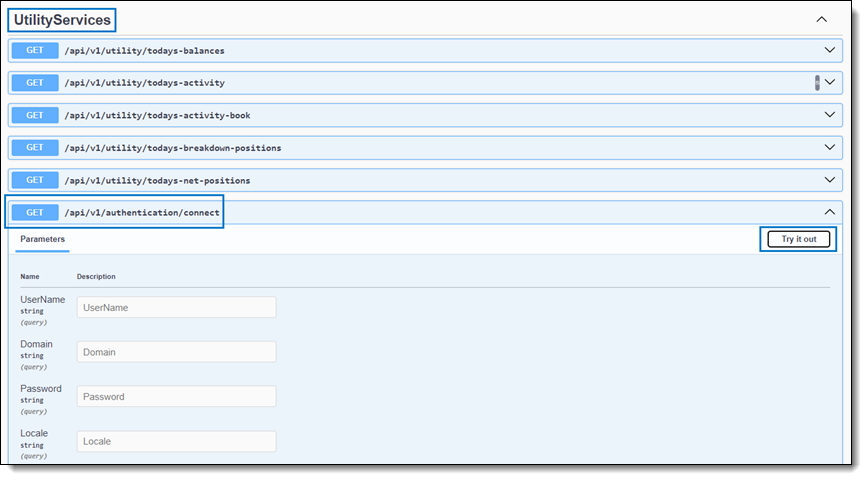
Navigate to the Authentication APIs section and click on connect API. The Parameters pane opens.
-
Click Try it out to enable the fields in the Parameters pane.
-
Enter your UserName, Domain, Password, and Locale details.
-
Click Execute.
-
The status is displayed in the Responses pane. If your login is successful, a UserToken is generated. You can use this UserToken to explore the REST APIs.
Note: The generated UserToken is needed for all the subsequent API calls.
-
You can also set the user token for your session by including it as a bearer token. Follow these steps:
-
Click Authorize button.
-
Enter the user token in the Value field.
-
Click Authorize.
Once set, you do not need to enter the user token for each API call.
-
Note: Contact your SS&C Eze client service representative if you need any assistance.
Note: Your account will be temporarily locked for 3 minutes if you attempt to log in three (3) times within 60 seconds, regardless of whether the attempts are successful or unsuccessful.
Note: Swagger does not support the Subscribe APIs (e.g., SubscribeOrderInfoRequest).